Benefits of LaTeX typesetting
I originally wrote the following article for OSNews in 2005. (You can still see the original article and follow the lively debate afterwards.) The vast majority of the content is still relevant, and probably will remain so for a long time. It's worth noting however, that applications such as Microsoft Word have addressed some of their shortcomings since 2005 and therefore not all examples may be as relevant as they once were. E.g., Word 2007 and greater now has bibliography tools built-in.
LaTeX isn't for everyone but it could be for you
Anyone who has used Microsoft Word for a reasonable amount of time will recognise my very own Andy's Laws on Word:
- Likelihood of a crash is directly proportional to the importance of a document.
- Likelihood of a crash is inversely proportional to the time left before its deadline.
- Likelihood of a crash is directly proportional to the duration since you last saved.
- Likelihood of you throwing your computer out of the window is directly proportional to the number of times Clippy pops up.
- That's enough laws for now...
In all seriousness, I've written many words in large documents using Microsoft Word. Nowadays, I can use OpenOffice because it's come a long way and really is a decent product (the current v2 beta is very good). However, ever since my never-ending woes with Word during my degree, when I started my PhD, I decided to go and try out LaTeX. Actually, that's not quite true, I wanted to submit a paper to a journal and it only accepted LaTeX documents. The deadline was the same day as I found out about the call for papers. I jumped straight into the deep-end with both feet. Needless to say, I had a hard time of it and wasn't LaTeX's best fan that day. (Lesson: don't try to learn something new in a rush!)
Undeterred, I stuck with LaTeX and realised that it wasn't so hard after all. There was a learning curve, but for the typical documents that I often wrote, there was very little to learn. I'm very glad I persevered because I wouldn't want to use any thing else for my papers/reports any more. I'm not the only one who's glad to move away from the WYSIWYG world. This article will not be a tutorial for how to use LaTeX, instead an overview of its benefits and why I think it trumps what word processors have to offer.
What is LaTeX?In 1978, Donald Knuth - arguably one of the most famous and well respected computer scientists - embarked on a project to create a typesetting system, called Tex (pronounced 'tech'), after being disappointed with the quality of his acclaimed The Art of Programming series. Around 10 years later, he froze the language after originally anticipating spending a single year! Tex gave extremely fine-grained control of document layout. However, the vast flexibility meant it was complex, so by the mid-80s Leslie Lamport created a set of macros that abstracted away many of the complexities. This allowed for a simpler approach for creating documents, where content and style were separate. This extension became LaTeX (pronounced 'lay-tech').
LaTeX is essentially a markup language. Content is written in plain text and can be annotated with various 'commands' that describe how certain elements should be displayed. The LaTeX interpreter reads in a LaTeX marked-up file, renders the content into a document and dumps it a new file. Therefore, it's not an interactive system that is the de-facto method for document creation nowadays.
Separation of content and styleNot the most obvious advantage, possibly because a lot of Word users don't understand why this so beneficial. When producing your LaTeX document, you are concentrating on the content itself. You introduce structure explicitly by telling LaTeX when a new section begins, for example, but you don't then faff around trying to decide how the section headers should look. That's done later.
This is opposed to the average Word user, who will immediately highlight a given section header and apply formatting to it: maybe a larger font, maybe underline, etc. The point is that this will then have to be applied to every header manually. LaTeX is better as it uses a document style. This defines how different elements within your document should look (like Cascading Style Sheets defining styles in HTML pages). If you fancy a change, you only change the style definitions once, then the presentation of the document will be updated automatically. This also ensures a consistent looking document (you wouldn't believe how many stylistically inconsistent Word docs I've read!)
Word does in fact have a similar Styles feature. However, because it's optional, people don't often know it exists. LaTeX forces you to declare the document semantics (this is a Good Thing!), which is why you can rely on it to produce a consistent looking document.
PortabilityLaTeX portability comes in multiple ways:
- An actual LaTeX file is merely a text file, which is just about the most portable format in computing.
- The LaTeX system that processes the text file and produces the finished document has been implemented on just about every mainstream platform you care to mention.
- The default output file format for LaTeX is DVI (which stands for device independent). This was around well before PDF was dreamed up and the high quality files can be viewed via software viewers or printed out. DVI is an open standard, so once again, readers are extremely portable and exist on most operating systems. Admittedly, DVI is hardly ubiquitous and nowadays it's often bypassed in favour for PDF (or it's very simple to convert to other formats like PS or HTML)
You can get LaTeX to do just about anything you can think of! Over the years, an overwhelming selection of packages to extend its potential and macros that can simplify complex tasks have come into being, most of which are freely available on CTAN. For example, LaTeX's main users are within academia and research institutions and they benefit hugely thanks to the Bibtex package that provides bibliography management - I pity my Word-using colleagues who suffer by actually manually word-processing their bibliographies (unless they've shelled out for a program like Endnote). There are other crazy packages that you can install which allow you to typeset music scores, chessboards and cross-words! CTAN is the main repository of these resources. Most are well documented and as you can imagine, with LaTeX being around for so long, the number of extensions is vast. The chances are, if you're struggling to do a task, someone will have undoubtedly written a package to solve it easily!
ControlEven with simple documents, you can quickly become frustrated by Word's rather unintelligent interference. The hours that are wasted trying to position that image which you know will fit at the bottom of the page, but Word refuses to put it there! How many can relate to this experience? You have your 30 page document with text, tables and images. You just spent the evening getting it formatted nicely - all your figures in the right place and then you notice that one of your paragraphs isn't clear enough. You add one sentence, which then pushes an image on to the next page, leaving a massive gap at the bottom of that page where your image once was. This then daisy-chains down, knocking other tables and images out of place all the way to the end of your document! It's a real laugh. Fortunately, LaTeX is much more clever in this respect and positions your images and tables with a lot of common sense. So, if you want your image to appear at the bottom of a given page, it'll stay there!
Whilst LaTeX makes decent typesetting decisions for you, if you want to, you can have total control over the presentation of your document.
QualityIt's difficult to disagree that the output from LaTeX is far superior to what Word can produce. This is emphasised greatest when it comes to documents with high mathematical content, which is a major strength for LaTeX. It also has much better kerning, hyphenation and justification algorithms that simply make the output far more professional than what any word processor. Its algorithms for laying out text are more sophisticated and extremely fine-grained. For example, the accuracy is so high because it uses a measurement known as a scaled point which translates as 100th of the wavelength of natural light!
LaTeX works with the concept of niceness (well, I suppose technically it's badness - which it works to minimise). LaTeX has a large set of metrics that it evaluates against when generating your document. It experiments with various permutations of parameters and determines the one which gives the "nicest" output. It can take the time to do this because it isn't interactive. Word processors don't have the computational resources available (yet) to carry out the equivalent calculations and still remain interactive. Also, many people forget that typesetting is actually a professional skill - people train for years to learn how to layout publications. Yet, as soon as you open a word processor, you go about committing typesetting sins all the way. Typesetters know for example that its easier to read sentences that are approximately 66 characters wide. Have a look in your books and count the letters! Also, why do newspapers and magazines have narrow columns? But, the default layout of a word processor gives an average of 100 words per line. I suppose many people don't mind, but you would notice if you read a lot of large documents.
A quick example. I took a document that I had used previously to demonstrate document structure in LaTeX. I used the same text and loaded it into Word and applied the equivalent styles. I've used default settings throughout. Word didn't have a style for abstracts, so I put the title in bold. View the LaTeX output to the Word output. The styles that Word uses aren't great. You could manipulate the default styles in Word to make it look more reasonable, but I've never been bothered because even if I could get it to match LaTeX stylistically, I still have to use Word, which I'd rather avoid!
LaTeX has been used regularly typeset entire books. Word processors simply aren't good enough for that job - they are used by the authors to write the content and these files are then imported into professional typesetting software. Ok, that's not strictly true - you could typeset a book in Word, just like you could drive a car with your feet - it's not a good idea though!
OutputAs mentioned, the default output is a DVI file. DVI was a clever little standard but unfortunately didn't take-off. It takes little effort to convert your document into a Postscript or PDF file (in fact, you can just use the 'pdflatex' command instead of normal 'latex' if you only ever want to create PDFs). There's no need to buy additional software such as Adobe Acrobat like you need to do to convert a Word document into PDF. (At least OpenOffice has its 'Export to PDF' functionality!)
ScalabilityIn my personal experience, using Word for documents with more than 20 pages has not been a pleasant experience. Obviously, that could be my own bad luck, but that is also the impression I've got from other users too.
With LaTeX, I've never found such problems. Additionally, you are free to split up large documents into smaller chunks and then let LaTeX combine them altogether later (like one chapter per file). It can also create tables of content, indexes and bibliographies easily, even on multi-file projects.
StabilityOne of the reasons why perhaps so many people struggle with Word when creating large documents, is because it is prone to crashes. 'Document recovery' is now a high ranking feature of Word. I'm sure people would prefer if MS would just make their software more stable! (NB stability issues are not necessarily generalisable, so I'm speaking from personal experience, and of my friends and colleagues - I do not know of a single user who hasn't lost work to Word, but that's not to say that such people don't exist.)
Because LaTeX is so mature - and developed by extremely clever programmers - bugs are negligible. And even if it were buggy, then there is no risk of you ever losing your original source text. Where as with Word, almost any tool within its integrated environment is capable of corrupting your file if it causes a crash.
Oh, you don't need to worry about macro viruses either!
CostWell, this is one area where LaTeX wins hands down, since it is free! As with most open source software, the phrase "you get what you pay for" doesn't hold true. You get an extremely mature system, that is still years ahead of its competition.
What about spell checking?It's a good point. This is not a deficiency of LaTeX, because it just processes the words you give it. However, within your text-editor, you do not get fancy lines highlighting your spelling errors or bad grammar as you type, like you get with Word, yet it's a feature users have come to expect when writing documents.
For starters, I do not really care for a grammar checker and anyone who actually relies on it when using Word would be better off buying a book (or looking at writing style guides) than taking the useless advice it provides.
Secondly, the 'auto-correct' feature - whilst looking like a good idea - is not beneficial in the long run. Sure, it corrects the common typos that we all make. However, the problem in my opinion is that it means we don't learn from our mistakes, e.g., you will continue to type 'teh' instead of 'the' because Word will sort it out for you. Having said that, if that's your thing, then you can easily configure any decent text editor to perform the same task. (You could, if you really wanted to, use your favourite word processor as your text editor - but then you back to square one on the stability issue.)
And so on to spelling. The great thing here is that you have a choice! Aspell and Ispell are the most popular spell checkers I know of (both open source). These will check any text file you care to feed it and you can easily configure a decent editor to integrate its functionality from within the editor itself. How to get your text editor to utilise these programs is obviously dependent on your editor of choice. Some, like Kate, interface external spell-checking programs without any effort. I personally use (g)vim which now comes with its own built-in spell-checker.
C'mon, be fair!Ok, I am obviously biased here. However, I am someone who uses both systems. It's perhaps not really fair to compare LaTeX and Word, because they are different types of system, which are suited to different jobs. However, for as long as people are using Word within academia and research institutions, I feel I should enlighten them and let them know what they are missing out on.
Sure, Word can be extended using its in-built scripting language. It also has document management features to help with large documents. As already mentioned, it has styles that can ensure manageable and consistent presentation. Yet very few people seem to take advantage of them. This is especially worsened by UI improvements that mean Word will hide features that you do not use, which makes it more difficult to remember what Word can actually do.
Word may have the advantage of a GUI which is good for beginners. It reduces the cognitive load as it's a case of recognition verses recall. If people really want a GUI, then there are ones that act as a front-end to LaTeX. It's not a WYSIWYG editor, because what you see on screen is not what you will get when you print it out. Instead, you have What-You-See-Is-What-You-Mean editors that still hold to the ideals of LaTeX by keeping content and style separate. However, they are environments that allow a more visual approach to your content, which is handy for producing complex equations, for example, but will pass your content to LaTeX for producing the final document. Lyx is the best example and was originally developed by Matthias Ettrich (yep, that's right, the same guy who founded the KDE project). You can also get LaTeX editors, which are like normal text-editors, in that you see all the raw LaTeX commands, but they come with additional features that help with creating that file, like table wizards, symbol databases, etc.
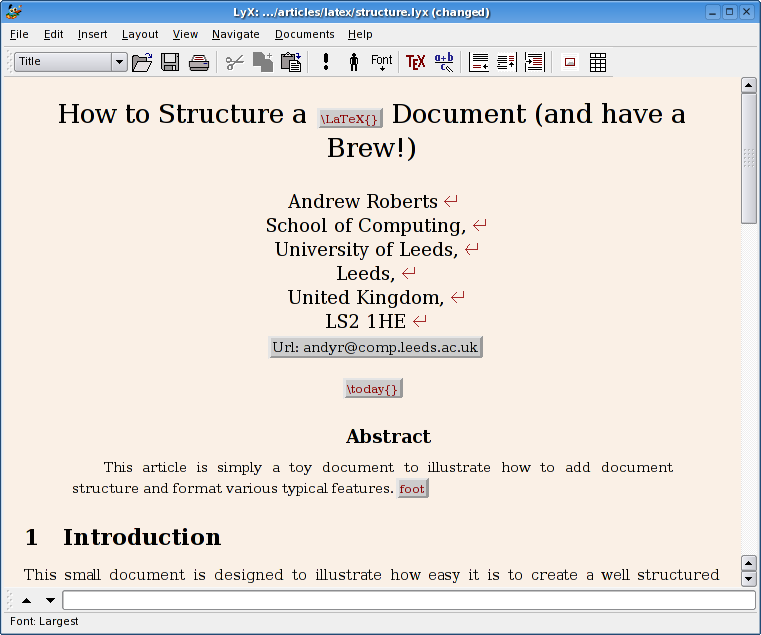
The reason why everyone isn't using LaTeX is because you can't just load up and go, like you can with a word processor. I consider LaTeX analogous to HTML with CSS. You need to put some markup around your text before your browser knows what to do with it - and the same is true with LaTeX. Of course, nowadays, any one can knock up a webpage thanks to, er, Word, and various other visual HTML editors and as a result, they generally look poor. So, you need to invest a bit of time in learning some basic commands, but you'll soon realise that it's very simple afterwards. Here's a LaTeX "Hello World!" as an example:
% hello.tex - Hello world LaTeX example

\documentclass{article}

\begin{document}

Hello World!

\end{document}
This that generates the following output. It wasn't that difficult, was it? To continue learning the basics, here are the best places to go:
- The Not So Short Introduction to LaTeX [pdf]
- Getting to Grips with LaTeX
- Text Processing Using LaTeX
Quite simply, anyone who is writing non-trivial documents and is tired of being let down by the performance of the current crop of word processors. If you are in academia, you really ought to be using it! Anybody writing anything maths related will not find a richer and better quality system. For example, even WikiPedia use LaTeX for rendering any formulas that appear on their site.
LaTeX isn't for people who are too lazy or dislike change! I personally found the investment paid off because LaTeX allows me to produce my documents at a greater pace. I know that the enterprise will not be interested as Word is so ingrained, even though their business reports would look so much nicer. Their loss! For everyone else, it's time to give it a fair try, just so that you compare and contrast, then decide which does the job best for your needs.